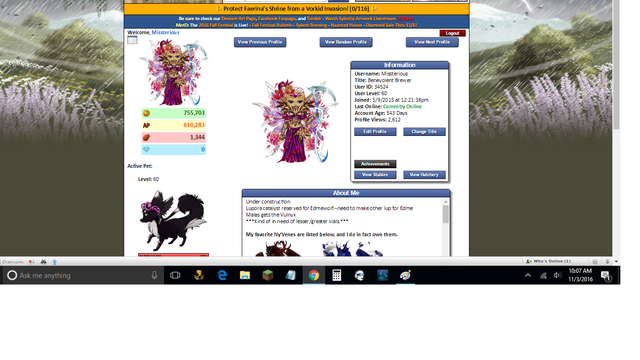
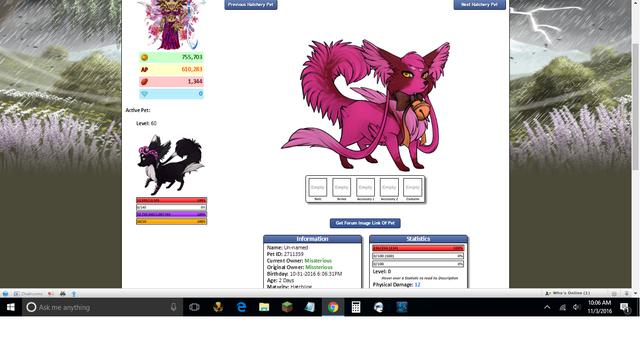
I know we were working on this last night, but apparently, relaunching didn't help. If someone finds a solution to this issue, please ping me. This is driving me bonkers.
Tab 1 is normal size
Tab 2 is not.
Zoom of the pages are 75% for both pages, however it seems to be out of whack for tab 2 because it does not look like 75% xD.
Now, I have tried relauching browser to update Chrome, which is the one Im using, have yet to see if this happens on Microsoft Edge- It looked like relaunching had temporarily fixed it, but not for long. Clearing cache didn't help. *not sure I want to reinstall Chrome, lol*
Edit: Most say the solution of reinstalling Chrome fixed this issue for them.
Edited By Krinadon on 11/3/2016 at 2:11 PM.
Littlemissmoriarty
Level 75
Supernatural Shopaholic
Joined: 5/9/2015
Threads: 329
Posts: 2,510
Posted: 11/3/2016 at 2:13 PM
Post #3
Just tried the reset defaults, didnt help. Off to go reinstall xD what a pain in the derriere.But, will let you know if that works.
Edit: Uninstalled all of chrome and extensions to be safe. Reinstalled, and logged in to my google and it worked.
So if anyone else has this issue, reinstalling is the only fix so far.
Edited By Littlemissmoriarty on 11/3/2016 at 2:19 PM.
Krinadon
Level 75
Shadow of the Moon
Site Administrator
Joined: 12/17/2012
Threads: 1,247
Posts: 15,455
Posted: 11/3/2016 at 2:20 PM
Post #4
I'm sorry. It's a really weird issue.
So, what's happening is... images have their native resolution. For pets (as an example), it's 500x500 pixels.
However, we obviously load pet images at much smaller sizes than 500x500. In order to achieve this, you just simply set the width and height of an image by adding the tags "width=200px" "height=200px".
So, now let's say you zoom out to 75%. It should load the image as 200x200 * 75%, which would be 150x150. However, for some reason, it's taking 500x500 * 75% and loading it as 375x375 and ignoring the fact that its size was set to 200x200. Why it's doing this, I have no idea. And from my end, I have no idea how to fix it because I'm already establishing the size of the image. For some reason, Chrome is just deciding to ignore it.
Now if it were a global Chrome bug, I could look into fixing it. But I use Chrome and this bug doesn't happen to me. So that makes it really hard to try and find a solution. =S
Littlemissmoriarty
Level 75
Supernatural Shopaholic
Joined: 5/9/2015
Threads: 329
Posts: 2,510
Posted: 11/3/2016 at 2:24 PM
Post #5
That is a wonderful explanation thanks. I don't think I had many extensions either, other than the sylestia one which btw is fantastic and a norton which automatically came with my internet package, so I don't think its an extension issue, I know many people probably have a ton, and that can cause problems too, but I am thrilled its fixed. Not a hard problem to solve, just a slight annoyance. And not your fault :) Thanks for everything!
Littlemissmoriarty
Level 75
Supernatural Shopaholic
Joined: 5/9/2015
Threads: 329
Posts: 2,510
Posted: 11/3/2016 at 3:27 PM
Post #6
Sigh, it blew up again---Any other browsers out there like chrome?
Krinadon
Level 75
Shadow of the Moon
Site Administrator
Joined: 12/17/2012
Threads: 1,247
Posts: 15,455
Posted: 11/3/2016 at 3:35 PM
Post #7
There is Chromium:
https://www.chromium.org/
I think there's also another beta-ish Chrome, but I can't think of its name atm.
Are you using the correct version of Chrome? They have a handful of options and it can be confusing on which one you actually chose.
I believe the basic are:
64-bit: Beta version
64-bit: Release version
32-bit: Beta version
32-bit: Release version
Do you know if your OS is 64-bit or 32-bit and if you are downloading the correct Chrome? Alternatively, you could just try and download the other version of Chrome regardless and see if that works.
Edit: This is my version: Version 55.0.2883.35 beta (64-bit)
Edited By Krinadon on 11/3/2016 at 3:36 PM.
Littlemissmoriarty
Level 75
Supernatural Shopaholic
Joined: 5/9/2015
Threads: 329
Posts: 2,510
Posted: 11/3/2016 at 3:43 PM
Post #8
64x bit Os with 64x based processor and touch screen if that matters at all.
Nice little laptop :D
I would have naturally assumed chrome would have been auto updated when I reinstalled, so I looked and
Version 54.0.2840.87 m (64-bit)
Google Chrome is up to date.
it is, as far as I know.
I have never really messed with updating browsers but now I perhaps should. Not sure where to get your version at but I shall go look and try that before heading to chromium. I sure loved chrome tho, very simple, easy, fun...though Chromium might not be too much different.
Alternatively, I did manage to m anually set the pages to 75% as thats my preference,and so far havent had issues with helping peoples pets via links, they haven't drank steroids yet...*knock on wood* So will keep fiddling around and keep ya posted on what works/doesnt work as far as chrome goes. I wont touch microsoft edge. J/s. lol
Edited By Littlemissmoriarty on 11/3/2016 at 3:45 PM.
Krinadon
Level 75
Shadow of the Moon
Site Administrator
Joined: 12/17/2012
Threads: 1,247
Posts: 15,455
Posted: 11/3/2016 at 3:45 PM
Post #9
Here is the link to my version:
https://www.google.com/chrome/browser/beta.html
Littlemissmoriarty
Level 75
Supernatural Shopaholic
Joined: 5/9/2015
Threads: 329
Posts: 2,510
Posted: 11/3/2016 at 3:50 PM
Post #10
Got it, relaunched and well, someone linked their stables and clicked on one of their pets and it blew up...this is insane. So even manually setting zoom to 75% doesnt help. Even with the updated beta version..idk wth is going on. Off to Chromium. lol
Go to Page:
1, 2, 3
Confirm Action
Are you sure you wish to delete this post?
Confirm Action
Are you sure you wish to restore this post?
Confirm Action
Are you sure you wish to report this post?
Go to Top
This Page loaded in 0.013 seconds.
Terms of Service | Privacy Policy | Contact Us | Credits | Job Opportunities