How do I post a picture of my sylesti on a thread? (trying to sell them)
Net
Level 60
Sweet Solver
Joined: 1/21/2013
Threads: 9
Posts: 197
Posted: 6/17/2013 at 3:36 AM
Post #2
@Mewzzer,
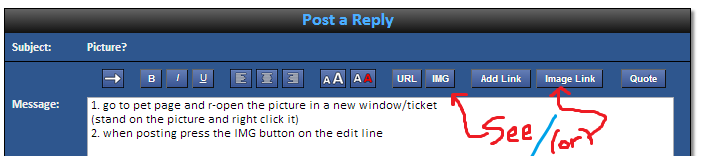
1. go to pet page and r-open the picture in a new window/ticket
(stand on the picture and right click it)
2. when posting press the IMG button on the edit line
3. copy the adress for the picture into the space between [img.] and [/img.]
*You can use the Image link, and link the picture to the pet page as well. See here (its big)
Edited By on 6/17/2013 at 3:46 AM.
VampVixen
Level 62
Majestic Green Thumb
Joined: 4/24/2013
Threads: 57
Posts: 928
Posted: 6/17/2013 at 11:04 AM
Post #3
"1. go to pet page and r-open the picture in a new window/ticket
(stand on the picture and right click it) "
^ Impossible
It's right click the picture and click "Copy Image URL"
Then follow the rest of the above instructions~
Net
Level 60
Sweet Solver
Joined: 1/21/2013
Threads: 9
Posts: 197
Posted: 6/17/2013 at 11:19 AM
Post #4
1. Not impossible- That is how it works on my computer
(the link above actually proves it xd)
-but your way is easier to do~ O.o
Edited By on 6/17/2013 at 11:25 AM.
VampVixen
Level 62
Majestic Green Thumb
Joined: 4/24/2013
Threads: 57
Posts: 928
Posted: 6/17/2013 at 1:00 PM
Post #5
Oh okay. I never noticed that o.o I guess I've always just copied the image url XD
Mewzzer
Level 70
Master Egg Hunter
Joined: 5/27/2013
Threads: 134
Posts: 3,005
Posted: 6/17/2013 at 4:43 PM
Post #6
Quote From:
Originally Posted: 5/5/2026 at 1:59:02am
@Mewzzer,
1. go to pet page and r-open the picture in a new window/ticket
(stand on the picture and right click it)
2. when posting press the IMG button on the edit line
3. copy the adress for the picture into the space between [img.] and [/img.]
*You can use the Image link, and link the picture to the pet page as well. See here (its big)
Thanks! ^_^ Lemme try it right now
Confirm Action
Are you sure you wish to delete this post?
Confirm Action
Are you sure you wish to restore this post?
Confirm Action
Are you sure you wish to report this post?
Go to Top
This Page loaded in 0.010 seconds.
Terms of Service | Privacy Policy | Contact Us | Credits | Job Opportunities